


CCleaner – Phone Cleaner
4.573.23K Reviews
App Specs
- Version
- 26.12.2
- Updated On
- License
- Free
- Downloads
- 100,000,000+
- Developer
- Piriform
- Categories
- Tools
- Platform
- Android, iOS
Screenshots
 Analysis by AppCompare
If you've ever found yourself staring at your phone wondering where all your storage went, you're not alone. That's why I decided to check out CCleaner – Phone Cleaner. I know, I know, it sounds like just another cleaning app, but hear me out. This one has some cool features that might just make it worth your time.
What to expect from a phone cleaner
Before you tap through a cleanup, it helps to know what a tool like this can and cannot do. Its main job is to help identify clutter that may be safe to remove; it cannot create more physical storage, and it cannot make every older phone feel new again. I treat cleaner suggestions as a chance to review what is taking space, not as an instruction to delete everything the app finds.
That distinction matters because a cache or a downloaded file can be convenient even when it is technically removable. Clearing temporary data may free room, but an app might need to rebuild some of it later, and deleting a file you still need can be more trouble than leaving it in place. My rule is simple: check the categories and the likely consequences before confirming a broad cleanup.
Guides and Analysis on CCleaner – Phone Cleaner
Getting Started with CCleaner
First things first, downloading CCleaner – Phone Cleaner was a breeze. Available on both Android and iOS, it took just a few taps and I was ready to dive in. The interface caught my eye right away. It's sleek, modern, and super easy to navigate. No clutter here, just a straightforward design that gets you where you need to go without any fuss.
First setup and a sensible scan
CCleaner is a free tools app from Piriform, with in-app purchases for users who want to consider paid options. It is rated for Everyone, and its long history is reflected in its release date of June 10, 2014. The current version is 25.23.0, and it requires Android 10 or later. Its average rating is 4.6 from around 3 million ratings, with about 73,000 reviews and over 100 million installs.
For a first-time user, I would begin by opening the app and looking around before accepting a cleanup suggestion. Read the labels, note which kinds of items the scan has found, and decide what you actually want to keep. If the app asks for access that is needed for a particular action, consider whether that action is useful to you before proceeding. A cleaner is most helpful when you understand what it is proposing, rather than treating every highlighted item as disposable.
If you are setting it up on a phone that is already nearly full, start with a small, deliberate cleanup rather than trying to reclaim as much space as possible in one go. That gives you a chance to see how the app presents its findings and to notice whether anything you rely on is included. I would also avoid making a recurring cleanup routine the first thing you configure; first learn which suggestions fit your habits.
Worth Reading Before You Choose

Ludo King Makes the Most of the Minutes Between Plans

Baby Panda World Brings Quick Play to Modern Phones, but Its Game Library Feels Busy

ESPN’s Live Game View Makes Following Close Games Easier

QuizzLand Review: A Good Fit for Short Trivia Breaks, Not Every Player

Basketball Stars: Multiplayer Is Fast, but Can It Recover When Matches Go Wrong?

WEBTOON Turns Phone Updates Into a Better Reading Routine
Main Features
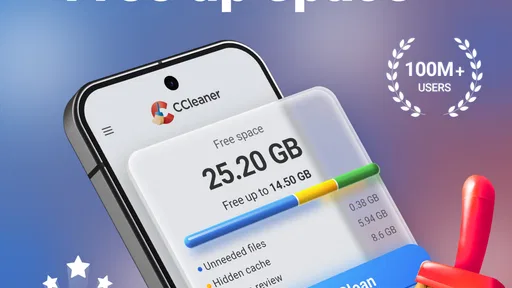
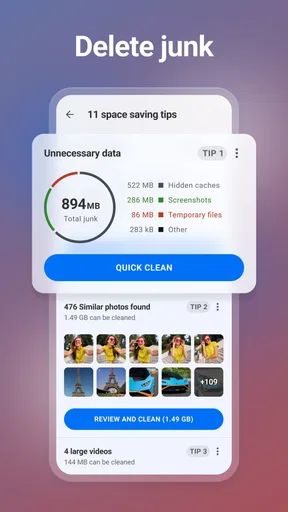
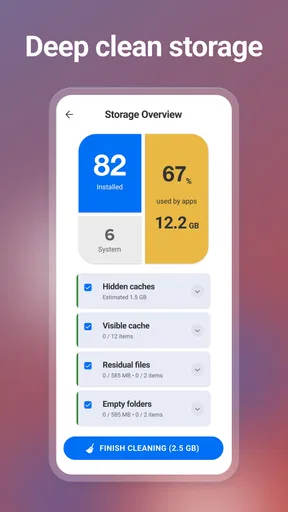
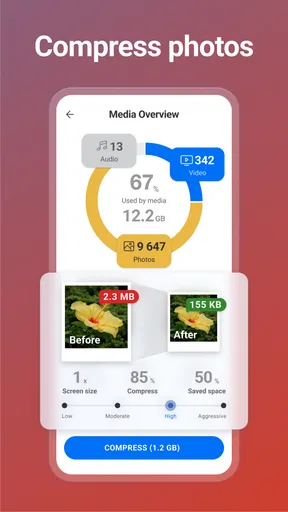
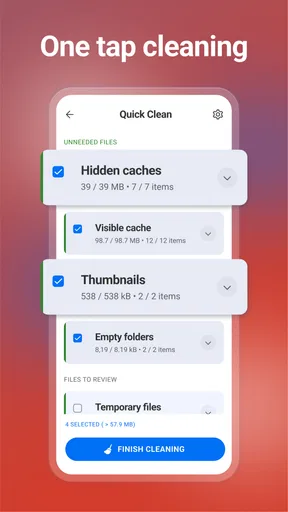
So, what does CCleaner actually do? Well, it promises to free up space on your phone by removing junk files, cache, and other unnecessary data. I was curious about how well it could actually perform these tasks, so I decided to put it to the test.
Storage Booster: This feature is a lifesaver. It quickly analyzes your phone's storage and identifies what's hogging all that precious space. In just a few minutes, I cleared out over a gigabyte of junk files. That's a lot of room for more photos of my cat!
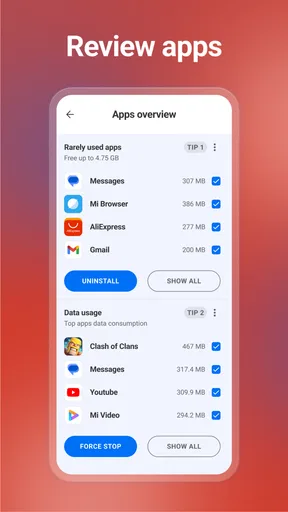
Performance Enhancer: Ever feel like your phone is moving at a snail's pace? The Performance Enhancer helps speed things up by managing apps running in the background. I noticed a significant improvement in my phone's responsiveness after using this feature.
Battery Saver: This one's a gem. It shows which apps are draining your battery and lets you hibernate them when they're not in use. It's a handy tool for anyone who's ever scrambled to find a charger halfway through the day.
Making the first cleanup count
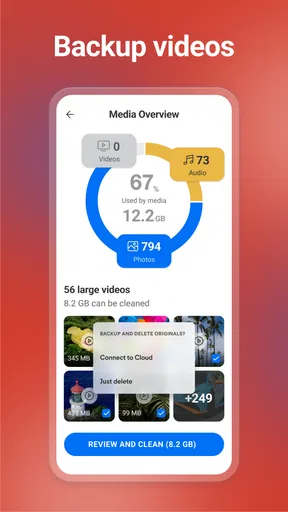
A useful first success is not necessarily the biggest number on a scan screen. If your phone is full because of large videos, offline media, or files you intentionally saved, a junk scan may not address the real cause. In that situation, use the scan as a clue, then review your own downloads and media in the apps where you stored them. A cleaner can help you spot an opportunity, but it is not a substitute for deciding what matters.
For example, imagine you are about to record a family event and your phone warns that space is tight. I would run a scan, inspect the suggested temporary items, and remove only the ones I recognize as safe to lose. Then I would check whether the camera or messaging apps have accumulated files I no longer need. This cautious sequence is more dependable than approving every category at once, especially when a missed download or an important attachment would be hard to replace.
One practical trade-off is that cleanup can be a temporary fix. Apps may recreate cached data as you use them, so a space gain does not always stay permanent. I would use the app when I need to diagnose clutter or free breathing room, then address a recurring storage problem at its source—for example, by removing media I no longer use or changing how much content I keep offline. Repeating a cleanup without checking what keeps returning can become busywork.
User Experience
Using CCleaner is as simple as it gets. The app doesn't bombard you with ads or unnecessary notifications, which is a huge plus in my book. The scans are quick, and the results are presented in a way that's easy to understand. Even if you're not tech-savvy, you'll have no trouble getting the hang of it.
I also appreciated the customization options. You can choose what types of files to delete, set up automatic cleaning schedules, and more. It gives you control over how the app works, which is something I found really empowering.
Where it fits among alternatives
Compared with relying only on a phone's built-in storage screen, CCleaner offers a focused cleaner workflow that can make a scan easier to understand. The built-in tools may still be the better first stop if you want to review large files or manage storage without adding another app. They are already part of the device experience, while a dedicated cleaner is useful when you prefer a guided overview and a clear place to inspect possible clutter.
It is also different from manually opening every app and clearing its stored data. That hands-on approach can be more precise, but it takes time and requires knowing which app controls which files. I would choose CCleaner for a quick, guided check, and use the individual app settings when I need finer control or when a particular app is causing a repeated storage issue. Neither approach makes sense as a ritual if your phone has plenty of free space and is working normally.
The app is a good fit for someone who feels unsure where storage has gone, prefers a visual scan, and is willing to review suggestions before acting. It is less compelling for someone who already manages files comfortably through the phone’s own settings, or who expects a cleaner to fix slow performance caused by an old device, a weak connection, or an app-specific problem. In those cases, diagnosing the actual cause is more useful than running another cleanup.
Common confusion and useful limits
One point that can be easy to misunderstand is the difference between removing clutter and managing an app’s behavior. A background-app control or hibernation option may affect convenience: an app you pause might not behave as expected until you open it again. I would be selective with anything that changes which apps stay active, especially for messaging, navigation, or services you depend on. If you notice a missed alert afterward, revisit that choice instead of assuming the phone itself is at fault.
Battery tools deserve the same caution. A list of apps associated with battery use is a prompt to investigate your habits, not proof that every listed app should be stopped. If you use an app frequently, keeping it available may matter more than trying to reduce its background activity. I find it more useful to look for an app I no longer need or a setting I can adjust than to disable something essential simply because it appears in a list.
Privacy claims should also be approached thoughtfully. I would not use any cleaner as a reason to store sensitive material carelessly or assume that a deletion option guarantees a particular result in every situation. Before removing personal files, check what you selected and whether you have another copy if the item matters. When a feature concerns secure deletion, read its in-app explanation and use it only when the purpose is clear.
Privacy and Security
In today's digital world, privacy is a big deal. I did some digging, and CCleaner seems to take this seriously. It doesn't access personal files or share your data with third parties, which gave me some peace of mind.
The app also offers a feature that allows you to securely delete files, so they can't be recovered. Perfect for those of us who want to make sure our data stays private.
Who should choose it, and what to try next
If you are new to cleaning apps, I would start with one scan and one carefully chosen action. Afterward, check whether the space you needed is available and whether your everyday apps still behave as you expect. That small follow-up is a better test of usefulness than assuming that a successful scan automatically means your phone will feel faster or last longer between charges.
For people who regularly download maps, music, or videos for trips, a scan can be a useful reminder to review offline content before leaving home. The best time to do that is while you have a connection and can decide what you still need. For someone who mainly takes photos, on the other hand, a cleaner may not be the main answer if the largest items are camera files; reviewing and backing up the media you actually want to keep is the more relevant next step.
CCleaner is free to start, while in-app purchases range from $1.39 to $27.99 per item. I would use the free experience first and only consider paying if a specific paid option addresses a need you have. If you are simply trying to understand your storage, there is no reason to assume that a purchase is the first step. Its broad adoption—over 100 million installs—may reassure some users that it is an established choice, but popularity does not replace checking whether its approach suits your phone and your comfort level.
Final Thoughts
All in all, CCleaner – Phone Cleaner is a solid choice if you're looking to tidy up your phone and boost its performance. It's user-friendly, effective, and respectful of your privacy. Whether you're running out of storage or just want your device to run smoother, it's definitely worth considering.
So, if your phone is starting to feel a bit sluggish, give CCleaner a spin. You might just find it’s the cleanup crew your device has been waiting for.
Pros
- Efficiently cleans junk files.
- Boosts phone performance noticeably.
- User-friendly interface design.
- Customizable cleaning options.
- Low impact on battery life.
Cons
- Free version has ads.
- Limited features without upgrade.
- Occasional false positives.
- Requires frequent manual updates.
- Some features need root access.
FAQs for CCleaner – Phone Cleaner
What features does CCleaner – Phone Cleaner offer?
CCleaner – Phone Cleaner provides a range of features designed to optimize your device's performance. These include junk file cleaning, RAM boosting, app management, and battery saving tools. It also offers real-time monitoring of your device's CPU, RAM, and internal storage, ensuring your phone runs smoothly.
Is CCleaner – Phone Cleaner safe to use on my device?
Yes, CCleaner is considered safe and has been developed by Piriform, a reputable company known for its PC cleaning software. The app does not contain malware and respects user privacy. It offers reliable cleaning tools without risking harm to your device’s operating system or personal data.
How does CCleaner improve my phone's performance?
CCleaner improves your phone’s performance by removing unnecessary junk files, clearing cache, and optimizing memory usage. This process frees up storage space and reduces the load on your device’s resources, leading to faster app launches and overall smoother operation.
Does CCleaner – Phone Cleaner include any premium features?
Yes, CCleaner offers a Pro version with additional features. These include scheduled cleaning, deeper analysis, and priority support. The Pro version is subscription-based and provides more advanced tools for users who require enhanced functionality and convenience.
Can CCleaner help extend my phone's battery life?
Yes, CCleaner includes a battery saver feature that helps extend your phone’s battery life. It identifies and stops apps running in the background that consume power, allowing your device to last longer between charges. This feature is particularly useful for users experiencing rapid battery drain.


